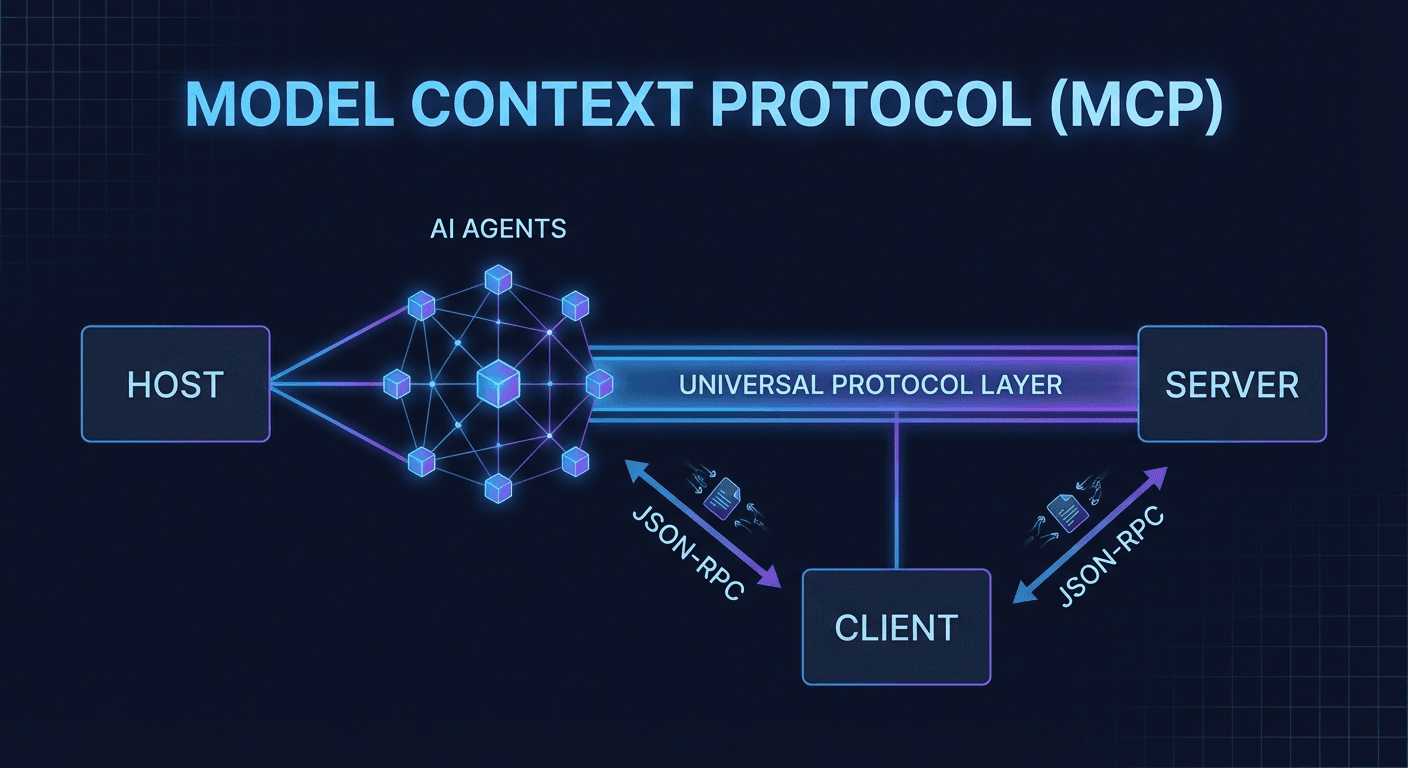
MCP is not just another API. It's a universal language — enabling AI Agents to communicate with any system without rewriting integrations every time you switch models.
If you've ever written a function calling schema for OpenAI, then had to rewrite it for Claude, then again for Gemini — you've run into exactly the problem MCP was built to solve.
1. What Is MCP? Why It Matters More Than REST/GraphQL for AI Agents
Model Context Protocol (MCP) is an open protocol developed and published by Anthropic in November 2024, designed to standardize how AI models connect to external data sources and tools.
Think of MCP as HTTP for the AI Agent world: HTTP doesn't care which browser you use or what server is running — it's a neutral communication layer. MCP does the same: it creates a standard bridge between AI models and the outside world.
The Problem Before MCP
Before MCP, every AI integration was its own island:
| Situation | Consequence |
|---|
| Using Claude with GitHub → switch to GPT-4o | Rewrite entire tool schema in OpenAI format |
| Add Gemini to your workflow | Rewrite again in Google's own format |
| Switch data source (PostgreSQL → MongoDB) | Update every AI integration manually |
| Run 3 AI models in parallel | 3x maintenance burden, 3x bug surface |
Result: 80% of AI Agent project time is spent on integration plumbing, not actual business logic.
How MCP Solves This
MCP cleanly separates two sides:
- MCP Server: You define capabilities (tools, resources) — write once
- MCP Host/Client: AI application (Claude Desktop, Cursor, VS Code...) — automatically understands your server
A properly written MCP server works immediately with any MCP-compatible AI application — no changes needed when switching models or AI hosts.
2. MCP Architecture: Host, Client, Server
MCP has three core components working in coordination:
┌─────────────────────────────────────────────────┐
│                  MCP HOST                        │
│   (Claude Desktop / Cursor / Claude Code CLI)    │
│                                                  │
│  ┌──────────────┐      ┌─────────────────────┐  │
│  │   AI Model   │◄────►│     MCP Client      │  │
│  │ (Claude/GPT) │      │   (Protocol Layer)  │  │
│  └──────────────┘      └──────────┬──────────┘  │
└────────────────────────────────── │─────────────┘
                                    │ JSON-RPC 2.0
              ┌─────────────────────┼────────────────────┐
              ▼                     ▼                     ▼
   ┌──────────────────┐  ┌──────────────────┐  ┌──────────────────┐
   │   MCP Server     │  │   MCP Server     │  │   MCP Server     │
   │     GitHub       │  │   PostgreSQL     │  │  Autonow CMS     │
   └──────────────────┘  └──────────────────┘  └──────────────────┘
MCP Host
The AI application the user interacts with directly. The Host is responsible for:
- Starting and managing connections to MCP Servers
- Deciding when to allow the AI to call tools (permission control)
- Displaying results to the user
Real examples: Claude Desktop, Cursor, VS Code with GitHub Copilot, Claude Code (CLI)
MCP Client
The protocol layer inside the Host — usually invisible to users:
- Maintains 1-to-1 connections with each MCP Server
- Translates between the AI model's language and the MCP standard protocol
- Handles authentication, errors, and session management
MCP Server
This is what you'll most commonly build. An MCP Server exposes 3 primitives:
| Primitive | Description | Real-world examples |
|---|
| Tools | Functions the AI can call to take actions | create_article(), query_database(), send_email() |
| Resources | Data the AI can read (read-only context) | File content, DB records, API responses |
| Prompts | Reusable prompt templates | code_review, summarize_document, translate |
Wire protocol: JSON-RPC 2.0 over stdio (local) or SSE (remote).
This is the most common question developers ask when getting started with AI tooling.
Function Calling (OpenAI style)
{
  "tools": [{
    "type": "function",
    "function": {
      "name": "get_weather",
      "parameters": {
        "type": "object",
        "properties": {
          "location": {"type": "string"}
        }
      }
    }
  }]
}
Only works with the OpenAI API. Want to use Claude? Rewrite from scratch in a different format.
{
  "tools": [{
    "name": "get_weather",
    "description": "Get current weather",
    "input_schema": {
      "type": "object",
      "properties": {
        "location": {"type": "string", "description": "City name"}
      },
      "required": ["location"]
    }
  }]
}
Better description support, but still vendor-specific — only works with Anthropic's API.
@mcp.tool()
def get_weather(location: str) -> str:
    """Get current weather for a location."""
    return fetch_weather_api(location)
MCP automatically generates the JSON schema from Python type hints and docstrings. Write once, run with any MCP-compatible AI host.
Comparison Table
| Criteria | Function Calling | Tool Use | MCP |
|---|
| Vendor lock-in | High (OpenAI) | High (Anthropic) | None |
| Auto tool discovery | ✗ | ✗ | ✓ |
| Resources/Files support | ✗ | ✗ | ✓ |
| Reusable prompt templates | ✗ | ✗ | ✓ |
| Multi-server native | Complex | Complex | Native |
| Full streaming support | Limited | Limited | ✓ |
| Growing ecosystem | Large | Medium | Exploding |
4. Real-World Demo: Autonow CMS Running on MCP
The article you're reading was created and published via MCP — not a metaphor, this is the actual system running at Autonow.
Autonow CMS + MCP Architecture
Claude Code CLI (MCP Host)
         │
         │  MCP Protocol (stdio)
         ▼
autonow-cms MCP Server
         │
         ├── list_articles()         → Query database
         ├── create_article()        → Create new article
         ├── update_article()        → Update content
         ├── generate_seo_metadata() → Auto-generate SEO
         ├── upload_image()          → Upload to R2/CDN
         └── publish_article()       → Go live on production
The Actual Workflow
Step 1 — A human editor talks to Claude Code:
"Write a post about MCP protocol, generate a cover image, publish to blog in both VI and EN"
Step 2 — Claude Code calls MCP tools in the right sequence:
article = create_article(
title="MCP Protocol...",
content_mdx="...",
locale="vi"
)
image = upload_image(file_path="/tmp/cover.png")
update_article(slug=article.slug, cover_image_url=image.url)
publish_article(slug=article.slug, locale="vi")
Step 3 — Article is live on autonow.vn/vi/blog/... within minutes.
Compared to the Old Way (Custom REST API)
| Aspect | Custom REST API | MCP |
|---|
| Code to call API | ~50 lines Python/JS | 0 lines — AI handles it |
| Schema documentation | Write and maintain by hand | Auto from tool definition |
| Error handling | Custom per endpoint | MCP protocol standard |
| Switching AI models | Refactor everything | No changes needed |
| Multi-model support | No (or very complex) | Native |
See also: Behind the Scenes: How Autonow Uses AI Agents to Run This Blog
5. Build Your First MCP Server in 30 Minutes
Installation
pip install mcp fastmcp
npm install @modelcontextprotocol/sdk zod
Python MCP Server (FastMCP — Fastest to Build)
from mcp.server.fastmcp import FastMCP
import httpx
mcp = FastMCP("my-server")
@mcp.tool()
def search_articles(query: str, limit: int = 10) -> list[dict]:
"""
Search articles in the database.
Args:
query: Search query string
limit: Max number of results (default: 10)
"""
results = db.search(query, limit=limit)
return [{"id": r.id, "title": r.title, "url": r.url} for r in results]
@mcp.tool()
def create_task(title: str, priority: str = "medium") -> dict:
"""
Create a new task.
Args:
title: Task title
priority: low | medium | high (default: medium)
"""
task = db.tasks.create(title=title, priority=priority)
return {"id": task.id, "status": "created"}
@mcp.resource("config://app-settings")
def get_settings() -> str:
"""Get application configuration"""
return "version: 1.0\nenvironment: production"
@mcp.prompt()
def summarize() -> :
__name__ == :
mcp.run()
TypeScript MCP Server
import { McpServer } from "@modelcontextprotocol/sdk/server/mcp.js";
import { StdioServerTransport } from "@modelcontextprotocol/sdk/server/stdio.js";
import { z } from "zod";

const server = new McpServer({ name: "my-ts-server", version: "1.0.0" });

server.tool(
  "create_task",
  "Create a new task in the project management system",
  {
    title: z.string().describe("Task title"),
    priority: z.enum(["low", "medium", "high"]).default("medium"),
    due_date: z.string().optional().describe("ISO date string, e.g. 2026-03-01"),
  },
  async ({ title, priority, due_date }) => {
    const task = await db.tasks.create({ title, priority, due_date });
    return {
      content: [{ type: "text", text: `Task created with ID: ${task.id}` }],
    };
  }
);

const transport = new StdioServerTransport();
await server.connect(transport);
Register with Claude Code CLI
claude mcp add my-server python /path/to/server.py
claude mcp add my-server \
--env DB_URL=postgres://localhost/mydb \
--env API_KEY=sk-xxx \
python /path/to/server.py
claude mcp list
Register with Claude Desktop
{
"mcpServers": {
"my-server": {
"command": "python",
"args": ["/path/to/server.py"],
"env": {
"API_KEY": "your-api-key"
}
}
}
}
Done. Restart Claude Desktop — your tools appear immediately, no further configuration needed on the AI side.
6. The MCP Ecosystem in 2026: Servers You Should Know
Since Anthropic open-sourced the MCP spec in November 2024, the ecosystem has grown rapidly.
Official Servers (Anthropic & Partners)
| Server | Functionality | Best for |
|---|
server-github | Repos, PRs, Issues, Actions | Dev workflow automation |
server-postgres | Query and analyze PostgreSQL | Data analysis, reporting |
server-filesystem | Read/write local file system | File automation, code gen |
server-slack | Messages, channels, search | Team communication |
server-google-drive | Docs, Sheets, Drive files | Document management |
server-brave-search | Web search via Brave API | Research, fact-checking |
Standout Community Servers
| Server | GitHub Stars | Description |
|---|
mcp-server-notion | 2.1k+ | Full Notion workspace integration |
mcp-rag | 1.8k+ | RAG pipeline as an MCP server |
mcp-server-docker | 1.2k+ | Docker container management |
mcp-linear | 900+ | Linear project management |
mcp-server-redis | 700+ | Redis operations and caching |
AI Applications That Have Adopted MCP (as of 2026)
- Anthropic: Claude Desktop, Claude Code CLI
- Cursor: Native MCP support in the editor
- Zed: AI editor with MCP integration
- Replit: Coding environment
- Codeium: AI code completion
- VS Code: Via GitHub Copilot extension
Trend: MCP Marketplace
Anthropic and the community are building MCP Hub — a marketplace where you can:
- Discover MCP servers by category
- One-click install into Claude Desktop
- Rate, review, and fork servers
- Publish your own servers publicly
This will be the App Store for AI Agent tools — and it's being built right now. Browse current servers at: github.com/modelcontextprotocol/servers
Conclusion: Is MCP the Future?
The short answer: Most likely.
MCP solves a real and widespread problem: fragmentation in AI tooling. Every model, every provider, every framework has its own way of connecting to external tools. MCP bets that standardization will win — and tech history (HTTP, USB-C, JSON, OpenAPI) shows that's usually the right bet.
Especially as more AI applications adopt MCP, the network effect grows stronger: every MCP server you build today will automatically be compatible with dozens of AI tools in the future — no updates required.
If you're building AI Agents in 2026:
- ✅ Learn MCP before learning any framework-specific tool integration
- ✅ Build MCP servers instead of custom REST APIs for AI workflows
- ✅ Contribute to the ecosystem — opportunity is still wide open, community is still small
Autonow has migrated its entire CMS integration to MCP — and we haven't looked back.
Read next: AI Agent Era 2026: OpenClaw, Zero Claw & Agentic Infrastructure for the full picture of the AI Agent framework landscape.